
Question: What should my team do in the first 24 hours after ransomware detection?
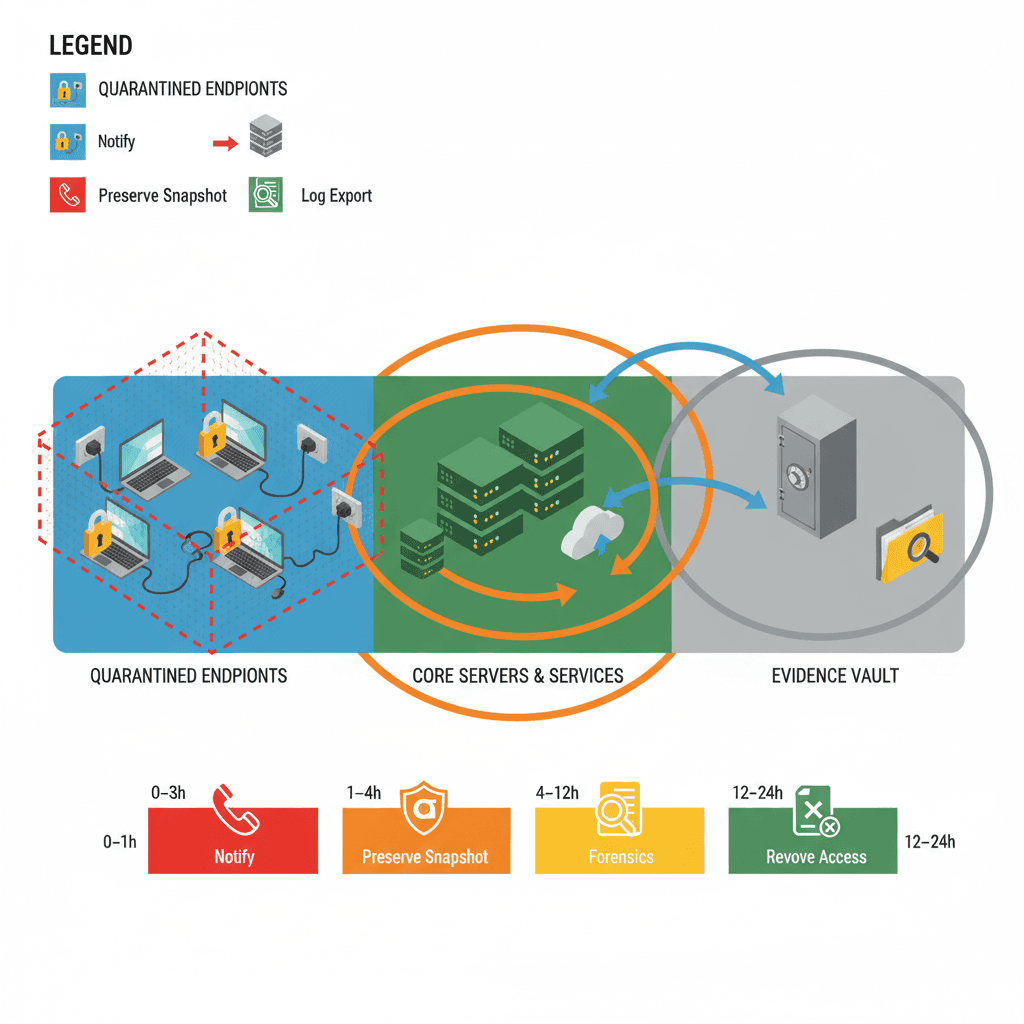
Answer: Follow a focused, time-boxed containment checklist: within the first hour isolate affected hosts and shut down lateral movement; within 24 hours collect system images and logs to preserve evidentiary value for regulators and insurers. These actions stop the spread, preserve forensic evidence, and enable prioritized recovery.
Overview: objectives for the first 24 hours (stop spread, preserve evidence, enable recovery)
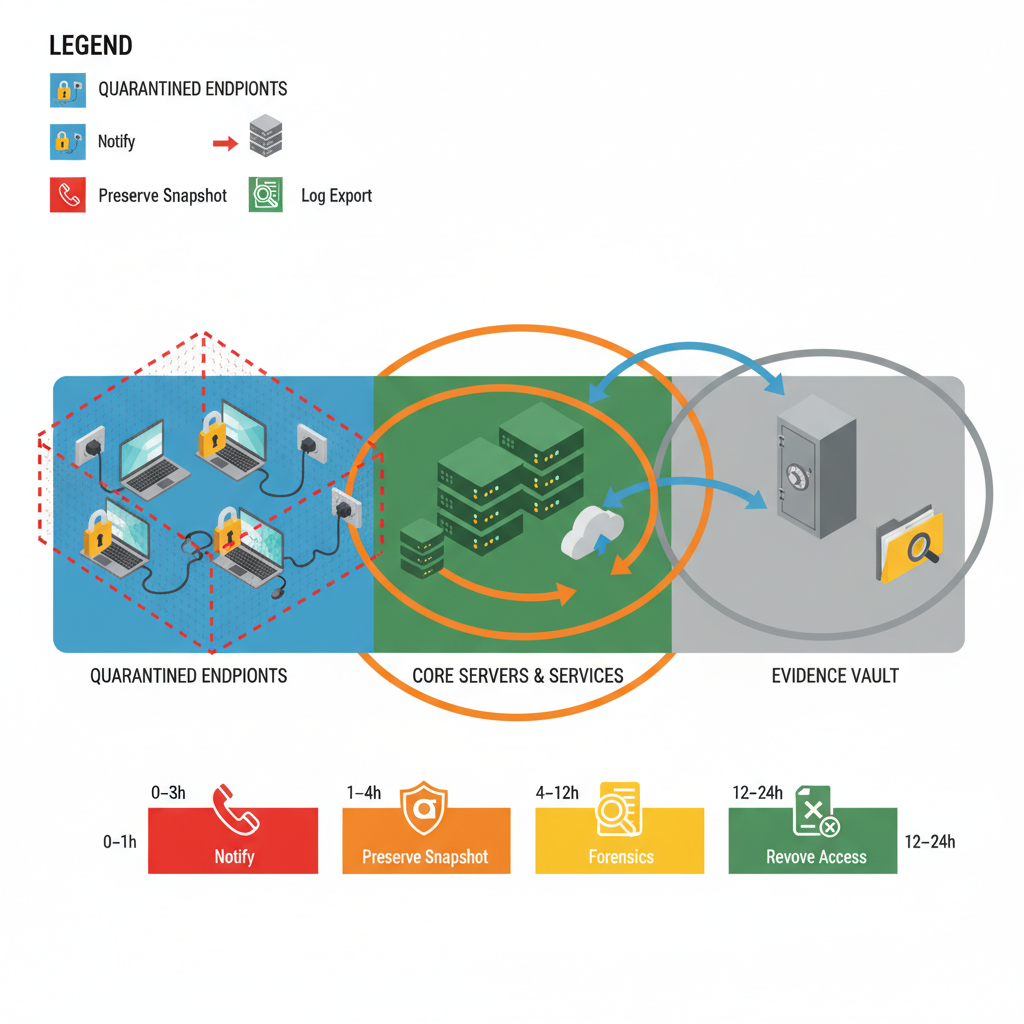
The primary objective in the first 24 hours is simple: stop the attack from spreading, preserve forensic evidence, and enable a safe, prioritized recovery. Use a single-sheet decision rule: if an endpoint shows signs of encryption, unusual service creation, or data exfiltration, treat it as compromised until proven otherwise. That rule forces decisive containment and prevents ambiguous delays that let ransomware move laterally, which is a crucial aspect of ransomware preparedness and recovery for NJ & NY businesses.
Concrete objectives for the first 24 hours: isolate infected hosts within one hour, collect volatile memory and EDR snapshots within four hours, secure backups and verify restore capability within 12–24 hours. For New Jersey and New York organizations, also note accelerated reporting obligations may apply for regulated entities under NYDFS; consult state resources such as NJCCIC and New York State cybersecurity pages for local contacts.
Who this is NOT for: This playbook is not for organizations with no networked systems, businesses that already have a full incident response retainer and are following their responder's playbook, or situations where the event is a benign false positive after immediate validation. If you host regulated production systems with outsourced incident response, follow your contractual escalation steps first. For more on this, see Ransomware incident response nj ny.
Hour-by-hour containment checklist (0–1hr, 1–4hr, 4–12hr, 12–24hr)
0–1 hour: confirm the incident, isolate affected endpoints, and stop lateral movement. Quickly identify patient-zero, unplug or disable network interfaces, and block obvious command-and-control (C2) domains at your perimeter or DNS. Use the rule: isolate first, investigate second. A practical checklist item: mark the top five suspected hosts and move them into an isolated VLAN or offline state within 60 minutes.
1–4 hours: preserve volatile evidence and build a timeline. Capture EDR snapshots, memory dumps, and running process lists. Pull SIEM alerts and authentication logs for the past 24–72 hours. Document timestamps and maintain a single incident log with who did what and when.
4–12 hours: validate backups and secure recovery targets. Verify that backup snapshots are intact and immutable; take a copy offline or to an air-gapped vault. Start a prioritized restore plan: critical systems (directory services, mail, payment systems) first, then supporting services.
12–24 hours: continue containment and begin limited restores for priority systems once forensic imaging is complete. Notify regulators and insurers as required. Keep communications tight and factual; avoid speculative public statements.
“Within the first hour isolate affected hosts and disable lateral movement channels; within 24 hours collect system images and logs to preserve evidentiary value for regulators and insurers.”
Immediate technical actions: network segmentation, isolate infected hosts, block C2 domains
Start by enforcing network segmentation and removing compromised machines from production networks. If possible, move infected endpoints into a preconfigured quarantine VLAN or apply NAC rules to block access to critical subnets. If VLAN changes aren’t available, disable wired/Wi‑Fi interfaces or physically unplug devices. For cloud-hosted workloads, revoke instance network access and snapshot disks before rebooting.
Block known C2 domains and IPs at the firewall and DNS level. Update endpoint policies to block SMB, RDP, and other high-risk lateral-propagation services from untrusted hosts. A practical threshold: block any external IP with repeated failed authentications or unusual DNS resolution within 15 minutes of detection.
EDR and SIEM tasks: alert triage, timeline extraction, snapshot preservation
Use your EDR to run rapid triage: identify execution chains, parent-child process trees, and persistence mechanisms. Export EDR incident logs and create a timeline of file modifications, new service installations, and suspicious authentication events. These are the core edr incident containment steps your investigators will need.
Preserve snapshots and memory images from affected hosts before remediation steps that would alter evidence. Export relevant SIEM data—authentication logs, VPN logs, and DNS queries—into write-once storage. Make at least one verified copy held outside the environment used during the attack to preserve forensic integrity and to preserve forensic evidence ransomware claims will require.
Containment must prioritize stopping lateral movement before deep forensic dives begin.

Communications and access controls: force password resets, revoke privileged sessions
Control human access early. Force password resets for all administrative and remote-access accounts and revoke active privileged sessions (RDP, SSH, VPN) until credentials are validated. Rotate service account credentials for the five highest-privilege accounts first, then expand to the rest. Enforce MFA enrollment or revalidation for all external access.
Prepare internal communications: a short, factual incident notice to staff with do-and-don't instructions (don’t connect to corporate VPN, don’t power-cycle suspected devices). For external communications, prepare a holding statement for customers and partners that confirms you’re investigating and will provide updates. Keep legal and compliance teams informed about state-specific reporting timelines—NY entities may face faster reporting windows under NYDFS.
Evidence preservation for forensic investigation and insurance claims
Preserve evidence methodically and avoid actions that destroy artifacts. Do not reimage or wipe drives before imaging; do not restart machines if a live memory image is required. Collect system images, EDR logs, firewall and DNS logs, VPN logs, and backup metadata. Label every artifact with date/time (UTC), collection method, and collector name.
Insurance and regulatory claims require demonstrable chain-of-custody and intact artifacts. Use a standard evidence log and store copies in immutable storage. For privacy-sensitive data, flag discovered personal data and coordinate with legal counsel on notification obligations.
“Collect system images and logs within 24 hours to preserve evidentiary value for insurers and regulators.”
Log collection, system images, chain-of-custody best practices
Collect timestamps in UTC and confirm time synchronization across sources (NTP). Export SIEM alerts, EDR telemetry, domain controller authentication logs, DNS logs, firewall logs, and cloud audit trails. Create forensic disk images using validated tools and generate cryptographic hashes (SHA-256) for integrity verification.
Maintain a written chain-of-custody form for each artifact: who had access, storage location, transfer dates, and hashes. Store evidence copies in a WORM-capable or immutable object store. These steps make forensic reports admissible to insurers, regulators, and law enforcement.
Hash every image at collection and keep at least one offline copy for legal and insurance reviews.
When to engage third-party forensic responders and legal counsel
Engage third-party forensic responders when you observe data exfiltration, when multiple critical systems are encrypted, when the incident impacts regulated data, or when ransom demands appear. Third-party responders provide impartial imaging, advanced threat hunting, and court-ready reports. Engage legal counsel immediately if personal data or regulated records are involved, or if you expect mandatory notifications under state or industry rules.
Use external responders when internal staff lack capacity for simultaneous containment, forensic preservation, and recovery. A decision rule: if recovery and forensic evidence collection cannot occur in parallel without delaying either by more than 8 hours, call outside responders.
Short-term recovery steps to resume critical operations (backups, restore prioritization)
Prioritize restores that return customer-facing and safety-critical services. Typical restore order: directory/authentication services, email and collaboration, payment and billing, then line-of-business systems. Restore from verified immutable backups only after imaging and preserving affected systems.
Test restores with a small user group before broad rollouts. Set clear success criteria: service health checks pass, no reintroduction of the ransomware (confirmed by EDR), and restored systems match pre-incident baselines. Track restore progress in the incident log and adjust priorities as new evidence emerges.
Checklist summary and downloadable 24-hour quick reference
Use this compact checklist as a quick reference during an incident. Copy it into your incident playbook or print for the on-call engineer.
- 0–1 hr: Confirm incident, isolate endpoints, block C2, revoke sessions.
- 1–4 hrs: Capture EDR snapshots, memory images, export SIEM logs, start timeline.
- 4–12 hrs: Secure and verify backups, image disks for forensics, notify insurers.
- 12–24 hrs: Begin prioritized restores, continue evidence preservation, engage third parties if needed.
| Time window | Primary actions | Artifact to preserve |
|---|---|---|
| 0–1 hr | Isolate hosts, block C2, revoke privileged sessions | EDR alert export, network captures |
| 1–4 hr | Collect snapshots, memory images, SIEM logs | Forensic disk images, memory dumps |
| 4–12 hr | Secure backups, begin tactical restores for critical systems | Backup metadata, restore verification logs |
| 12–24 hr | Continue restores, report to regulators/insurers, engage responders | Incident timeline, chain-of-custody forms |
For NJ and NY businesses that want an incident response partner, consider reviewing our services and scheduling an assessment. To discuss an active incident or schedule a post-incident review, contact us, visit our contact us page, or open a support request at contact us. You can also request a demo of our managed offerings at our services.
FAQ
What is containment playbook? A containment playbook is a time-sequenced set of actions and decision rules that stop ransomware spread, preserve forensic evidence, and enable prioritized recovery in the first 24 hours after detection.
How does containment playbook work? It works by enforcing rapid isolation of compromised assets, preserving volatile and persistent artifacts for investigators, applying access-control and communication controls, and sequencing restores from verified backups to resume critical operations.