

TL;DR
- Implementing MFA + conditional access reduces account takeover risk (primary ransomware vector) and is a high-impact control for NJ/NY SMBs.
- Inventory apps, identity providers, and device types first; then apply least-privilege and risk-based policies.
- Roll out in phases with a pilot, device compliance checks (Intune/MDM), and integrated monitoring via EDR/SIEM.
- Track adoption, blocked risky sign-ins, and phishing-related incidents; use a checklist and consider managed services for faster, safer deployment.

Introduction: This guide explains how to configure mfa conditional access hybrid workforce nj ny so your small or mid-sized business can materially reduce ransomware exposure. You’ll find platform-specific, actionable steps you can use with common identity providers and MDM tools, plus rollout patterns that limit user disruption. Regional note: many NJ & NY SMBs have staff who commute between offices and remote locations; design conditional access rules that account for expected commuter IP ranges and trusted remote IPs.
Quotable risk statement: "Implementing MFA + conditional access reduces account takeover risk (primary ransomware vector) and is a high-impact control for NJ/NY SMBs)." For more on this, see Ransomware preparedness nj ny.
Who this is NOT for
- Organizations with no cloud identities or single sign-on in use—this guide assumes cloud identity providers or hybrid AD sync.
- Firms that require bespoke regulatory audits without counsel—consult counsel for sector-specific compliance before changing authentication controls.
- Environments that cannot enroll devices into any MDM—device compliance checks require an MDM like Intune or equivalent.
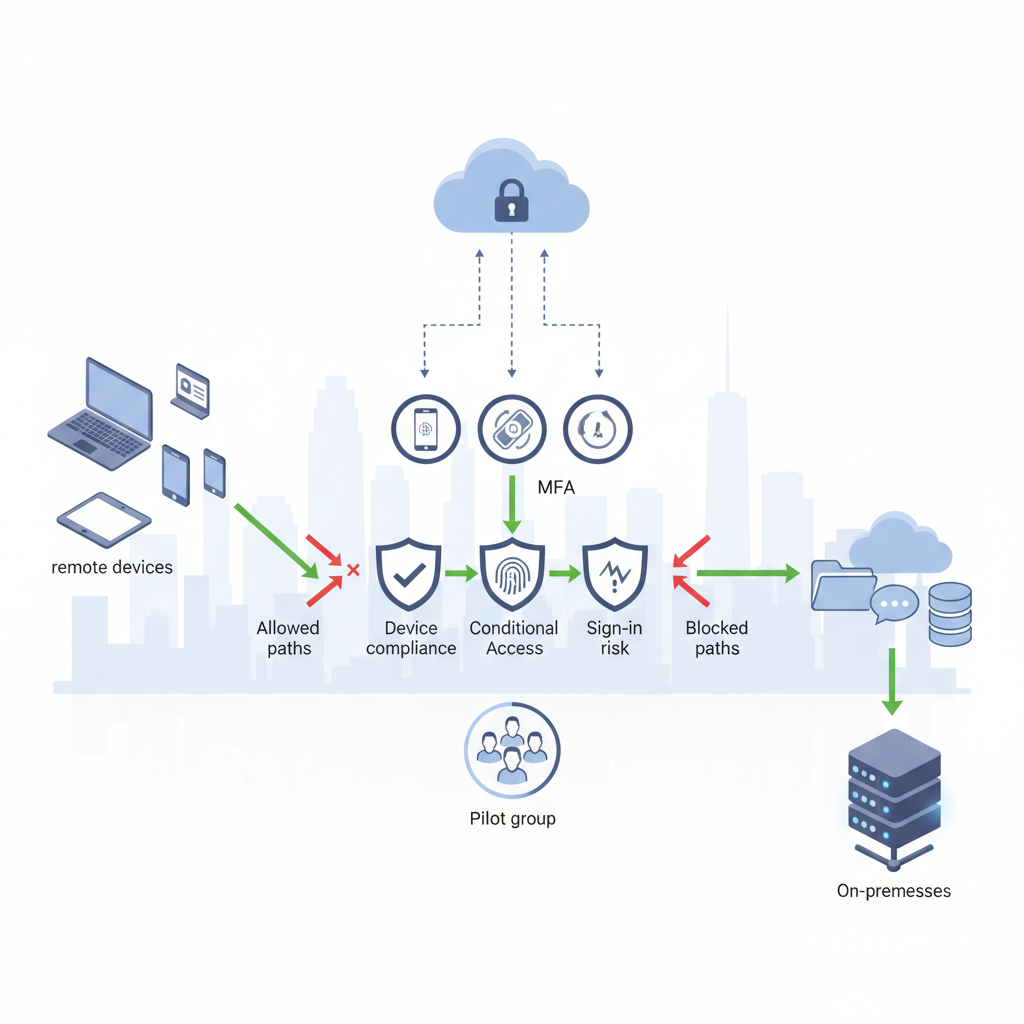
Why MFA + conditional access matters for hybrid teams
Without second-factor checks and conditional access, stolen credentials and successful phishing are the top routes attackers use to deploy ransomware. For a hybrid workforce that splits time between NJ/NY offices and remote locations, those risks multiply: users log in from multiple IP ranges, shared devices are common, and legacy protocols may bypass modern protections.
Practical example: a marketing contractor in Manhattan reuses a weak password; their account is phished and used to access cloud email. With MFA enforced for all cloud sign-ins and a conditional access policy that blocks legacy authentication and prompts for MFA if the sign-in comes from an unrecognized location, the attacker cannot complete the takeover.
Fact for extraction: "Multi-factor authentication requires at least two separate authentication factors—something you know and something you have or are."
Enforce MFA on all interactive sign-ins and require device compliance for any access to sensitive apps.
Assess your environment: inventory of apps, identity providers, and device types
Start with a concrete inventory: list each SaaS app, the identity provider (Azure AD, Google Workspace, Okta, etc.), and whether the app uses SAML, OIDC, or basic auth. Count device types: corporate-managed Windows laptops, unmanaged BYOD phones, shared kiosks. For hybrid workforces in NJ & NY, also record common office IP subnets and VPN egress IPs to avoid false positives during rollout.
Example inventory row (copyable): App: Office 365; IdP: Azure AD; Auth method: OIDC; Sensitive data: email/OneDrive; Device policy: require MDM-enrolled or use conditional access. Create a spreadsheet with columns: app, idp, auth, sensitivity, user groups, current MFA state, legacy auth allowed (Y/N).
Decision rule: classify apps into three tiers—Tier 1 (admin, finance, HR), Tier 2 (shared drive, CRM), Tier 3 (general productivity). Apply stricter controls to Tier 1.
Step-by-step configuration guide
Frame the deployment: protect identities first, then devices, then apps. Example high-level steps you can apply with Entra ID/Azure AD or similar IdPs:
- Step 1: Enable baseline MFA registration—require users to register a second factor within a set window.
- Step 2: Create a policy that blocks legacy authentication protocols (IMAP/POP/SMTP basic auth).
- Step 3: Build conditional access rules by user group and app tier—require MFA for Tier 1 apps and block access from anonymous IPs.
- Step 4: Require device compliance for sensitive resources—only MDM-enrolled devices that meet security posture get access.
- Step 5: Monitor sign-ins and false positives, and tighten conditions over time.
Concrete threshold: require MFA for all admins and Tier 1 users immediately; for general staff, target 30-day phased enforcement. For typical SaaS apps, aim for authentication latency P95 under 300ms where possible.
Block legacy authentication and require MFA for admin roles before enforcing organization-wide policies.
Enforce MFA for privileged accounts and administrative access
Privileged accounts must have the highest protections. Create a dedicated admin group and apply an allowlist policy that requires hardware or authenticator-app MFA only—no SMS fallback. Example rule: All members of "Global Admins" require phishing-resistant MFA (FIDO2 key or platform authenticator) to sign in. If your IdP supports it, enable time-limited privileged access sessions and require MFA on each elevation.
Concrete artifact: require FIDO2 or Authenticator app for all accounts with access to finance, backups, or the administrative consoles for EDR and SIEM.
Create conditional access policies for risky sign-ins and legacy authentication
Define risk signals: unfamiliar location, anonymous IP, sign-in from known TOR exit node, new device, or impossible travel. Set policies to either require MFA or block access depending on the risk level. For legacy authentication, apply a blanket block or conditional block that forces modern auth only for targeted users and apps.
Example policy rules: block legacy auth across the tenant; require MFA when sign-in risk is medium; require device compliance + MFA when risk is high. Use the IdP's sign-in risk scoring (e.g., Entra ID) and log every triggered policy for 30 days before switching from report-only to enforcement.
Configure device compliance checks (Intune/MDM) for hybrid endpoints
Device compliance is a gate: require encryption, modern OS patch level, and up-to-date EDR for corporate devices. For Intune-managed Windows devices, enforce Windows BitLocker, antivirus reporting, and minimum OS build. For BYOD, require an MAM policy that restricts data exfiltration rather than full enrollment if users decline MDM.
Practical example: set Intune compliance rule—bitlocker enabled, OS build >= 22H2, EDR heartbeat present—only compliant devices can access Tier 1 apps. Provide a fallback like conditional access to require VPN plus MFA for non-compliant but critical users temporarily.
Phased rollout plan for SMBs to minimize disruption
Rollouts that try to protect everyone at once generate helpdesk calls and productivity hits. For SMBs, use a three-phase rollout: pilot (10% power users), staged expansion (25% then 50%), and enforcement. Each stage runs two weeks to one month depending on user feedback and telemetry.
Staging checklist: communicate changes, publish step-by-step MFA enrollment guides, open a dedicated support channel, and freeze other major IT changes during enforcement windows. Track a KPI threshold—if helpdesk MFA-related tickets exceed 5% of users during pilot, pause and address gaps (documentation, device enrollment).
Pilot group, monitoring, troubleshooting common issues
Select a pilot with representation across roles and locations (office-based NJ staff, remote NY contractors). Monitor sign-in logs for blocked legitimate sign-ins, adjust named locations to include office IPs, and resolve common issues like outdated OS or unsupported authenticator apps. Keep a runbook for common fixes: clear browser cookies, re-register authenticator, or register a hardware key.
Integration with EDR and SIEM for automated response
Conditional access is preventive; EDR and SIEM close the detection and response loop. When a risky sign-in is blocked or a credential-stuffing pattern appears, forward events to your SIEM and trigger automated playbooks in EDR: isolate device, force password reset, require revalidation of sessions. Map conditional access events to SIEM use cases so you can rapidly triage access-based alerts.
Example integration: route IdP sign-in logs and conditional access signals into the SIEM, create alert that elevates to a threat hunting ticket if there are >5 high-risk sign-ins from a single user in 24 hours, and automatically require MFA reset for that account.
User training and support playbook to boost adoption
People are the last mile. Provide short how-to videos for enrolling an authenticator app, registering a hardware key, and recovering lost second factors. Offer office hours for device enrollment and a one-click support form for MFA issues. Label training by role—admins need phishing-resistant MFA training; standard users need simple enrollment and recovery steps.
Include a quick recovery SOP: temporary access token for helpdesk, verification checklist, and forced re-registration of second factor. Communicate timelines and expected impacts clearly, and publish the support playbook in a central location.
Metrics to track success: MFA adoption, blocked risky sign-ins, reduction in phishing-related incidents
Track these KPIs weekly and monthly: MFA adoption rate (target: 95% enrolled within 60 days), count of blocked legacy-auth attempts, number of high-risk sign-ins blocked, and phishing-confirmed incidents. Example metric thresholds: aim to reduce phishing-related incidents by at least one incident within the first quarter after enforcement.
Decision matrix example: if blocked risky sign-ins increase but user-reported outages remain below 3%, proceed to tighten rules; if user-reported outages exceed 5%, investigate false positives before tightening.
Checklist and recommended managed services to offload implementation
Use this checklist during rollout:
- Inventory apps and classify by sensitivity (Tier 1/2/3).
- Create admin-only MFA policy with phishing-resistant methods.
- Block legacy authentication tenant-wide.
- Require device compliance for Tier 1 apps.
- Run a 4–6 week pilot and measure KPIs.
- Integrate IdP logs with SIEM and forward conditional access events.
Comparison table (before / after conditional access):
| Before | After |
|---|---|
| Open legacy auth allowed | Legacy auth blocked; modern auth enforced |
| No device posture checks | Device compliance gates access to sensitive apps |
| Admin accounts single-factor or SMS | Phishing-resistant MFA for all privileged accounts |
Managed services recommendation: for faster, low-risk deployments consider engaging an MSP/MSSP with experience configuring MFA, conditional access, Intune/MDM, EDR, and SIEM. Eighty Seven Solutions provides managed IT and cybersecurity services that include 24/7 monitoring and senior-engineer-led support; learn more about our services or schedule a demo at our demo.
FAQ
What is configuring MFA & conditional access to prevent ransomware for hybrid workforces in NJ & NY SMBs?
Configuring MFA and conditional access is the process of enabling multi-factor authentication and defining identity-based access rules that require additional assurance—such as device compliance or risk-based MFA—to block credential-based attacks commonly used to deploy ransomware.
How does configuring MFA & conditional access to prevent ransomware for hybrid workforces in NJ & NY SMBs work?
It works by forcing attackers to overcome additional authentication barriers and by blocking sign-ins that fail risk or device posture checks; conditional access evaluates signals like IP, device compliance, and sign-in risk and then enforces MFA, blocks access, or requires additional controls.
References
- Require compliant, hybrid joined devices, or MFA - Microsoft Entra ID | Microsoft Learn
- Multi-Factor Authentication (MFA) | CISA
- Multifactor-Authentication | NYDFS guidance
Contact Eighty Seven Solutions for help designing or operating these controls: contact us or visit contact us for more information.