

TL;DR
- Cyber insurance readiness = demonstrable technical controls + documentation required by underwriters.
- Follow a 90‑day plan: collect evidence, deploy MFA/EDR/patching, test backups and IR, then package an evidence bundle.
- Insurers commonly require MFA, EDR with alerting, documented backup tests, and an incident response plan; lacking these can raise premiums or cause declination.

Introduction — why a 90‑day plan matters for regulated NJ & NY businesses
The phrase "90 day cyber insurance readiness checklist nj ny" describes a focused, executable plan to show insurers you manage cyber risk. Cyber insurance readiness means two things: demonstrable technical controls and clear documentation that underwriters can evaluate quickly. For regulated entities in New Jersey and New York — including financial services and healthcare organizations subject to NYDFS 23 NYCRR 500 or HIPAA — insurers expect documented controls aligned to regional rules.
A 90‑day window is realistic for most small-to-midsize regulated firms: auditors and brokers want evidence, not promises. Start by inventorying your assets, then close high-impact gaps (MFA, endpoint detection, backups) and run one evidence-packed test. In practice, many organizations find the most time sinks are evidence collection and vendor SLA excerpts; plan resources accordingly.
Who this is NOT for:
- Organizations with no digital assets or internet-facing systems — this checklist assumes an active IT estate.
- Firms planning a full cloud migration during the 90‑day window — major migrations invalidate short-term evidence.
- Entities lacking any executive sponsorship for security work — you need a decision owner to meet insurer timelines.
Cyber insurance readiness = demonstrable technical controls + documented evidence for underwriters.
Quick overview — what insurers look for (controls + documentation)
Insurers underwrite cyber risk by checking both controls and evidence. Controls: multi-factor authentication (MFA) for remote access and admin accounts, endpoint detection and response (EDR) with active alerting, enterprise backup with immutable copies, regular patching, and centralized logging. Documentation: an asset inventory, incident response (IR) plan, backup test logs, SIEM alert summaries, and third-party vendor attestations such as SOC reports.
Regional context matters: NYDFS (23 NYCRR 500) sets expectations for financial firms in New York, and HIPAA drives evidence requirements for healthcare organizations in NY/NJ. Insurers will often ask for specific artifacts labeled as "NYDFS cyber insurance evidence" or a "HIPAA cyber insurance checklist" for healthcare. Expect underwriters to request screenshots or exports showing MFA enabled, EDR deployment coverage, recent backup test results, and a table-top IR exercise summary.
Insurers commonly require MFA, EDR with alerting, documented backup tests, and an incident response plan; lacking these can result in higher premiums or declination.
90‑Day Roadmap (Weeks 0–12) — high-level timeline
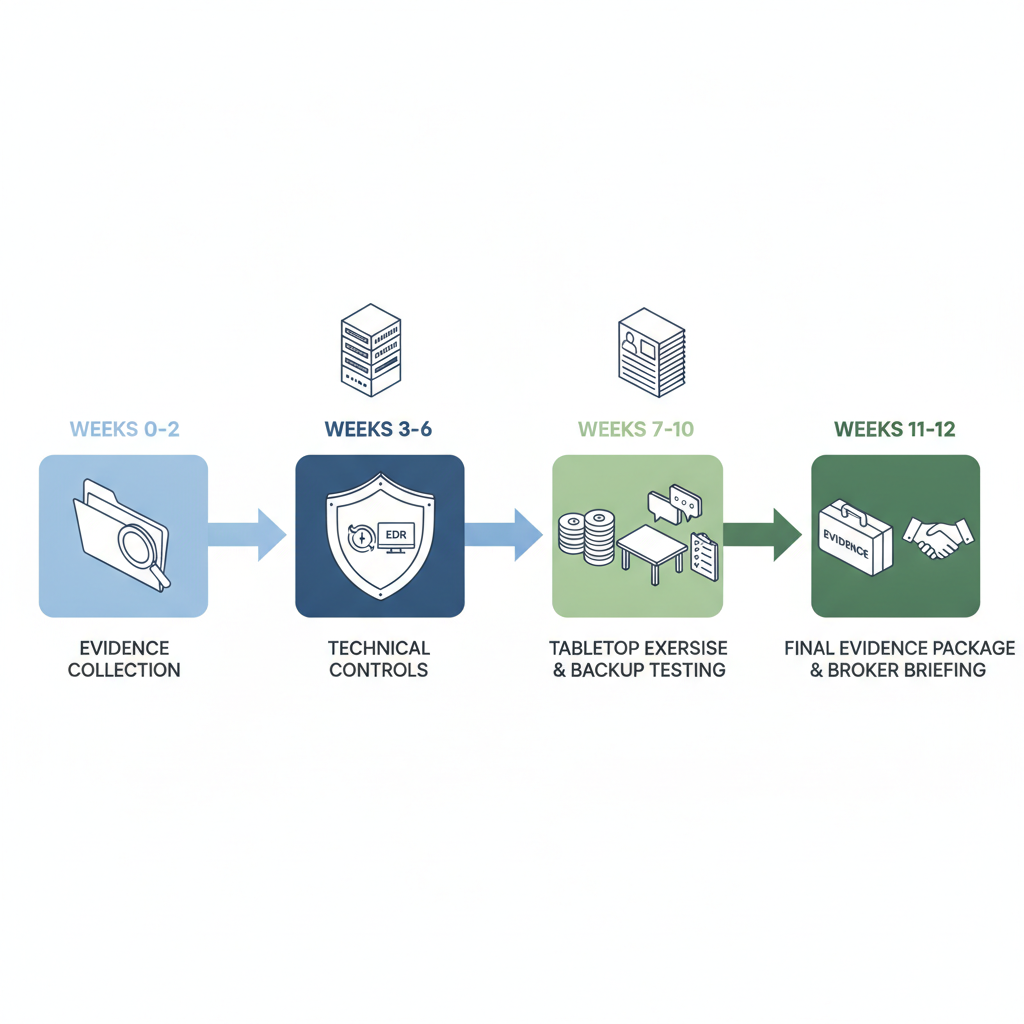
This roadmap focuses on the fastest path from discovery to deliverable evidence. Week 0 is evidence triage and gap assessment. Weeks 1–6 prioritize technical controls that insurers weigh most heavily. Weeks 7–10 validate backups, run an IR table-top and tune logging. Weeks 11–12 finalize the evidence package and brief your broker so submission goes smoothly.
| Period | Primary objective | Deliverable |
|---|---|---|
| Weeks 0–2 | Collect evidence & triage gaps | Inventory, current policies, baseline SIEM report |
| Weeks 3–6 | Deploy MFA, EDR, patching | MFA screenshots, EDR coverage report, patch log |
| Weeks 7–10 | Test backups, run IR table-top, validate logging | Backup test log, IR after-action, SIEM summary |
| Weeks 11–12 | Package evidence & broker briefing | One compressed evidence bundle and Q&A script |
Weeks 0–2: Evidence collection & gap triage
Start by exporting what insurers ask for: asset inventory export, AD/O365 user list, vulnerability scan summary, backup job history, SIEM alert counts for the last 30 days, and copies of security policies (IR, access, backup). Create a single tracker that lists the artifact, its file path, and the person responsible. Prioritize gaps that are quick wins: enabling MFA, enabling EDR on unprotected endpoints, and documenting last successful backup date.
Example: an organization discovers 20% of admin accounts lack MFA. The remediation is to enable conditional access for admin UPNs and capture a console screenshot within the 90‑day window. Track this in your evidence tracker so brokers see progress, not just a static gap list.
Weeks 3–6: Implement high-impact technical controls (MFA, EDR, patching)
Deploy MFA for all remote access and privileged accounts; require it for VPN, cloud consoles, and email. Roll out EDR to all endpoints and ensure it forwards telemetry to a managed SIEM or vendor portal. Patch management should target critical and high CVEs first — aim to reduce the window of exposure rather than chasing every low-severity fix immediately.
Concrete thresholds: enable MFA on 100% of admin accounts; deploy EDR to at least 95% of user endpoints; apply critical patches within 14 days where feasible. Capture evidence: MFA configuration screenshots, EDR deployment report, and the patch management dashboard export.
Weeks 7–10: Backup testing, incident response table-top, and logging
Run a restore test from backups and document the process and recovery time. Test a single critical application restore end-to-end and log the steps. Conduct a tabletop incident response exercise with roles and a short after-action report; include screenshots of communications templates and a list of recoverable assets. For logging, provide SIEM alert samples and demonstrate alert-to-ticket timeframes.
Sample artifact: a one-page backup test log that shows backup timestamp, restoration steps, files restored, and validation steps. Insurers value proof that backups are not just configured but are tested and restorable.
Weeks 11–12: Prepare the evidence package and broker briefing
Compile a single compressed evidence bundle (PDFs and CSVs) organized by insurer request: Controls, Policies, Tests, Vendor Evidence. Create a two-page executive summary that lists the top mitigations and remaining action items. Prepare scripted responses to common underwriter questions and schedule a broker briefing to walk through the bundle.
Include an export index (filename, description, produced date) so underwriters can quickly find artifacts like "EDR deployment report (devices covered)" or "Backup restore log — 2026-04-12". Brokers appreciate this; it shortens review time and reduces follow-up questions.
Controls checklist (actionable items insurers commonly require)
Underwriters look for practical controls you can show quickly. This checklist maps controls to the artifact you should provide. Use it as your live progress tracker: check the control, attach the artifact, and sign off with a date.
- MFA enabled for all admin and remote access accounts — artifact: policy + console screenshot.
- EDR deployed and monitored — artifact: deployment report and sample alerts.
- Enterprise backups with immutable copies and successful restore tests — artifact: backup job history and test log.
- Patch management and vulnerability scanning program — artifact: scan summary and patch tickets.
Identity & access controls (MFA, privileged access, SSO)
Document your identity architecture: an export of privileged accounts, proof of MFA enforcement, and any SSO/conditional access rules. If you use single sign-on, include the IdP configuration showing enforcement levels. For privileged access, include an approval workflow or privileged access policy excerpt.
Endpoint & detection (EDR, managed SIEM, alerting SLAs)
Provide an EDR deployment report with device counts and last-seen timestamps. Include SIEM summaries that show recent high-severity alerts and your mean time to acknowledge. If you work with a managed provider for SIEM, include an SLA excerpt or weekly summary report from the vendor.
Backups & recovery (enterprise backup, immutable copies, tested DR)
Supply backup retention settings, evidence of immutable snapshots if used, and a documented restore test. Insurers prefer evidence that a restore was performed successfully within a reasonable window for business continuity — attach the restore steps and validation artifacts.
Patch management & vulnerability scanning
Export the most recent authenticated vulnerability scan and a patch ticket register showing remediation dates for critical findings. If you can't patch immediately, include compensating controls: network segmentation, host-based controls, or temporary offboarding from internet exposure.
Documentation checklist — what to include in your insurer submission
Insurers assess written evidence as much as technical evidence. Provide concise, labeled documents that answer their typical questions. Organize files into Controls, Tests, Policies, and Third-party. A short index file (CSV) that describes each artifact speeds underwriter review.
Asset inventory & network diagrams
Include an asset inventory export with device names, owners, OS, and classification (e.g., PHI, financial). Add a simple network diagram showing internet boundary, VPN, cloud apps, and segmentation. Highlight critical data flows that match your business processes so insurers can map risk to impact.
Policies & procedures (IR plan, business continuity, access policy)
Attach an incident response plan excerpt showing escalation roles, contact lists, and legal counsel points of contact. Add a business continuity summary that identifies RTOs/RPOs for critical systems. Include an access policy that demonstrates how accounts are provisioned and deprovisioned. For more on this, see Contact us.
Logs & monitoring evidence (SIEM summaries, alerting cadence)
Provide a 30‑day SIEM summary PDF with representative alerts and the ticket numbers for the highest-severity incidents. Show your alert-to-ticket SLA and at least one closed ticket demonstrating the process from detection to remediation.
Third‑party vendor & MSP contracts (SLA excerpts, SOC reports)
Attach SLA excerpts for critical vendors and any SOC 2 or SOC 3 reports you have. If you rely on an MSP or MSSP for monitoring, include the managed service summary and an excerpt of your support agreement showing coverage windows and escalation points.
How to package evidence when working with an MSP/MSSP
When you work with an MSP or MSSP, centralize artifacts they can produce: EDR deployment lists, managed SIEM summaries, backup test logs, and patching reports. Ask your provider for exports in PDF or CSV and ensure timestamps and source system names are included. Label each artifact with the system owner and production date.
Templates for insurer Q&A and supporting artifacts
Prepare a one-page Q&A script that answers: "How is MFA enforced?", "What percentage of endpoints have EDR?", "When was the last backup test?" Attach the corresponding artifacts and a short executive summary. This template cuts broker back-and-forth during submission.
Common insurer questions and suggested answers (scripted responses)
Use declarative statements when answering underwriter questions. Example responses: "MFA is enforced for all privileged accounts; see admin MFA screenshot." or "EDR is deployed to 95% of endpoints; see EDR deployment report." Include brief contextual notes for NYDFS or HIPAA requirements where applicable.
FAQ — What is 90-day cyber insurance readiness checklist for regulated nj & ny businesses? A 90‑day cyber insurance readiness checklist nj ny is a prioritized plan that prepares regulated New Jersey and New York organizations to produce the technical and documentary evidence insurers require for underwriting.
FAQ — How does 90-day cyber insurance readiness checklist for regulated nj & ny businesses work? The checklist sequences work into discovery, remediation, validation, and packaging phases so you can show demonstrable controls and tests to an underwriter within three months.
Red flags to remediate immediately (items likely to trigger higher premiums or declination)
Address these urgently: no MFA on admin accounts, missing EDR on a significant number of endpoints, untested backups, no incident response plan, critical unpatched vulnerabilities older than 90 days, and absence of vendor SOC reports where third parties process regulated data. Any of these can increase premiums or prompt declination.
Next steps post‑submission — renewal hygiene and ongoing evidence
After submission, maintain a rolling evidence folder and update it quarterly. Keep a one-page executive summary of changes for your broker at renewal. Schedule quarterly backup tests and annual IR table-tops, and keep SIEM and patching extracts on file to reduce friction at renewal time.
Conclusion — how an MSP/MSSP can sustain readiness and what to ask your broker
An MSP or MSSP can sustain readiness by producing repeatable artifacts: weekly EDR and patching reports, monthly SIEM summaries, and documented backup tests. Ask your broker what specific artifacts they prefer and provide a single evidence bundle tied to those requests. If you want help operationalizing these items, review our services or schedule a demo at our services. To discuss readiness, contact us or visit the company site contact us.